
alphaalfa v0.1.0 · Linux
ross_visualizer
Listens to everything your computer plays and paints it with the colors of the album art. Full screen, or as an overlay above your windows that lets clicks through. No audio source to pick and no account to sign in to.
Escucha todo lo que suena en tu compu y lo pinta con los colores de la portada. En pantalla completa o como overlay encima de tus ventanas, que deja pasar los clics. Sin elegir fuente de audio y sin iniciar sesión.
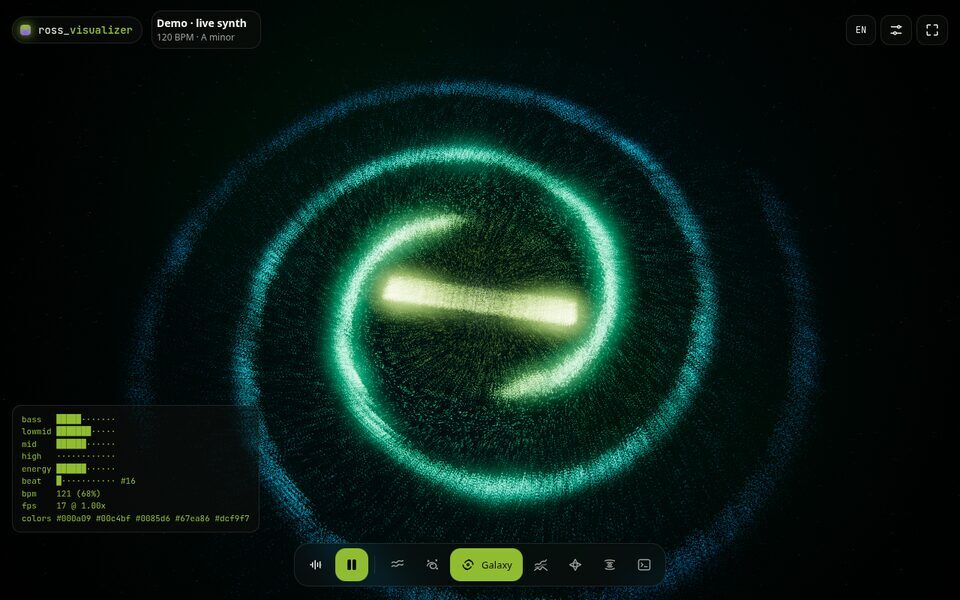

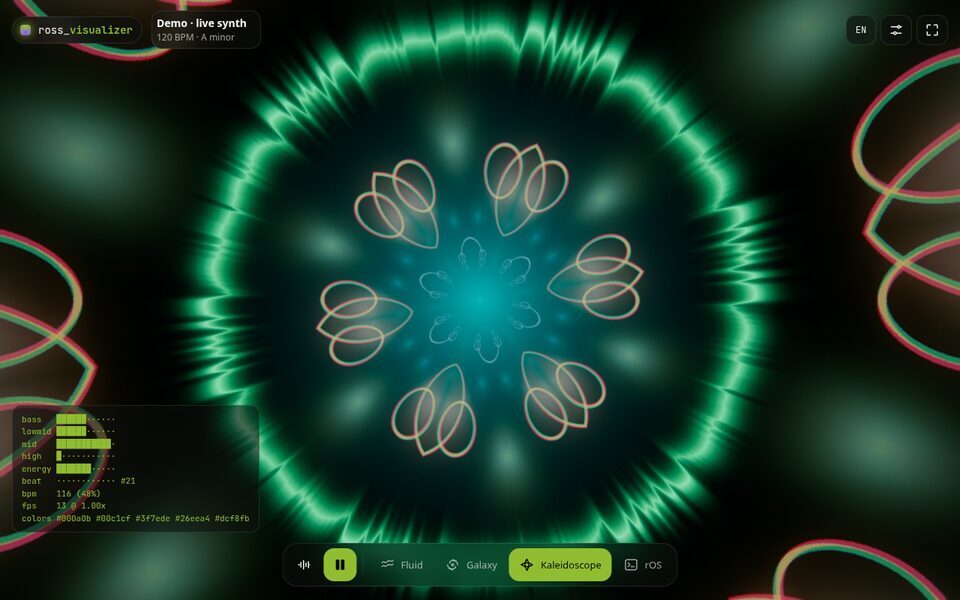
It's an alpha. It works, but expect rough edges. If something looks off or doesn't run on your system, open an issue with the output of the check below.
Es una alfa. Funciona, pero todavía puede tener detalles. Si algo se ve raro o no anda en tu sistema, abre un issue con la salida de la comprobación de abajo.
Will it work on my computer?
¿Va a funcionar en mi compu?
This checks your system and tells you which features will work. It only reads: it installs nothing, asks for no password and sends nothing anywhere. Run it from a terminal on your desktop.
Esto revisa tu sistema y te dice qué funciones van a andar. Solo lee: no instala nada, no pide contraseña y no envía datos a ningún lado. Córrelo desde una terminal de tu escritorio.
curl -fsSL https://repo.rossmel.com/check.sh | bashRather read it first? It's on GitHub. Its messages are in Spanish for now.
¿Prefieres leerlo antes? Está en GitHub.
Install
Instalar
From the signed [ross] repository: you add it once and updates arrive with the rest of your system.
Desde el repositorio firmado [ross]: lo agregas una vez y las actualizaciones llegan con las del resto de tu sistema.
Add the repository and install
Agregar el repositorio e instalar
curl -fsSL https://repo.rossmel.com/key.asc | sudo pacman-key --add -
sudo pacman-key --lsign-key C08F57FCE06B95B52145012C274187B9D5E9FFEB
printf '\n[ross]\nServer = https://repo.rossmel.com/arch/x86_64\n' | sudo tee -a /etc/pacman.conf
sudo pacman -Syu ross-visualizer-bin
Update
Actualizar
sudo pacman -SyuUninstall
Desinstalar
sudo pacman -Rns ross-visualizer-binAdd the repository and install
Agregar el repositorio e instalar
curl -fsSL https://repo.rossmel.com/key.asc | sudo gpg --dearmor -o /usr/share/keyrings/ross.gpg
echo "deb [arch=amd64 signed-by=/usr/share/keyrings/ross.gpg] https://repo.rossmel.com/apt stable main" | sudo tee /etc/apt/sources.list.d/ross.list
sudo apt update
sudo apt install ross-visualizer
Update
Actualizar
sudo apt update && sudo apt upgradeUninstall
Desinstalar
sudo apt remove ross-visualizerAdd the repository and install
Agregar el repositorio e instalar
sudo curl -fsSL https://repo.rossmel.com/rpm/ross.repo -o /etc/yum.repos.d/ross.repo
sudo dnf install ross-visualizer
dnf asks whether you trust the key the first time. Its fingerprint is C08F 57FC E06B 95B5 2145 012C 2741 87B9 D5E9 FFEB.
La primera vez dnf pregunta si confías en la clave. Su huella es C08F 57FC E06B 95B5 2145 012C 2741 87B9 D5E9 FFEB.
Update
Actualizar
sudo dnf upgradeUninstall
Desinstalar
sudo dnf remove ross-visualizerDownload the AppImage of version 0.1.0, make it executable and run it. It works on any distribution, but it doesn't update itself and your system still needs pipewire and playerctl.
Descarga el AppImage de la versión 0.1.0, hazlo ejecutable y ábrelo. Sirve para cualquier distribución, pero no se actualiza solo y tu sistema igual necesita pipewire y playerctl.
chmod +x ross_visualizer_0.1.0_amd64.AppImage
./ross_visualizer_0.1.0_amd64.AppImage
The first time you open it, a short tour shows the scenes, the overlay and the keyboard shortcuts for your desktop.
La primera vez que la abres, un tutorial corto te muestra las escenas, el overlay y los atajos de teclado para tu escritorio.
Keyboard shortcuts
Atajos de teclado
Two shortcuts turn the overlay on and switch its style from anywhere, without opening the app. Every desktop keeps its shortcuts in its own config, so the app can't add them itself.
Con dos atajos prendes el overlay y cambias de estilo desde cualquier lado, sin abrir la app. Cada escritorio guarda sus atajos en su propia configuración, así que la app no puede agregarlos sola.
| Shortcut | Atajo | Does | Qué hace |
|---|---|---|---|
Super+Ctrl+V | Turns the overlay on or offPrende o apaga el overlay | ||
Super+Ctrl+B | Next overlay styleSiguiente estilo de overlay |
Inside the binds { } block of ~/.config/niri/config.kdl. niri picks them up when you save.
Dentro del bloque binds { } de ~/.config/niri/config.kdl. niri las toma al guardar.
Mod+Ctrl+V hotkey-overlay-title="Visualizer: overlay on/off" { spawn "ross-visualizer" "overlay" "toggle"; }
Mod+Ctrl+B hotkey-overlay-title="Visualizer: next overlay style" { spawn "ross-visualizer" "overlay" "next"; }
In ~/.config/hypr/hyprland.conf. Hyprland picks them up when you save.
En ~/.config/hypr/hyprland.conf. Hyprland las toma al guardar.
bind = SUPER CTRL, V, exec, ross-visualizer overlay toggle
bind = SUPER CTRL, B, exec, ross-visualizer overlay next
In ~/.config/sway/config, then run swaymsg reload.
En ~/.config/sway/config, y luego corre swaymsg reload.
bindsym Mod4+Ctrl+v exec ross-visualizer overlay toggle
bindsym Mod4+Ctrl+b exec ross-visualizer overlay next- Open System Settings → Keyboard → Shortcuts.
- Add New → Command or Script. Paste the first command and give it
Meta+Ctrl+V. - Do the same with the second command and
Meta+Ctrl+B.
- Abre Preferencias del sistema → Teclado → Atajos.
- Añadir nuevo → Comando o script. Pega el primer comando y asígnale
Meta+Ctrl+V. - Repite con el segundo comando y
Meta+Ctrl+B.
ross-visualizer overlay toggle
ross-visualizer overlay next
In your desktop's settings, give each command a shortcut. GNOME and X11 have no overlay, so you don't need them there.
En la configuración de tu escritorio, asigna un atajo a cada comando. En GNOME y en X11 no hay overlay, así que no hacen falta.
ross-visualizer overlay toggle
ross-visualizer overlay next
With the AppImage, replace ross-visualizer with the file's path. With no setup at all: right-click the app's icon in your launcher or dock and pick "Overlay on/off" or "Next overlay style".
Con el AppImage, cambia ross-visualizer por la ruta del archivo. Sin configurar nada: clic derecho en el ícono de la app en tu lanzador o dock y elige "Overlay sí/no" o "Siguiente estilo de overlay".
Requirements
Requisitos
The repositories install every dependency. Only these depend on your system:
Los repositorios instalan todas las dependencias. Solo esto depende de tu sistema:
| Feature | Función | Needs | Qué necesita |
|---|---|---|---|
| The app and its scenesLa app y las escenas | Linux x86_64 with glibc 2.35 or newer and a GPU with WebGL2Linux x86_64 con glibc 2.35 o más nueva y una GPU con WebGL2 | ||
| Reacting to the musicReaccionar a la música | PipeWire running. PulseAudio alone isn't enoughPipeWire corriendo. PulseAudio solo no alcanza | ||
| Song, artwork and controlsCanción, portada y controles | A player with MPRIS: Spotify, a browser and most Linux playersUn reproductor con MPRIS: Spotify, un navegador y casi todos los de Linux | ||
| Overlay above your windowsOverlay sobre las ventanas | Wayland with layer-shell: KDE Plasma, Hyprland, Sway, niri and others. On GNOME or X11 you get full screen without the overlayWayland con layer-shell: KDE Plasma, Hyprland, Sway, niri y otros. En GNOME o X11 tienes la pantalla completa, sin overlay |
Packages
Paquetes
| Format | Formato | For | Para | Package | Paquete |
|---|---|---|---|---|---|
| pacman | CachyOS, Arch, EndeavourOS, Manjaro | ross-visualizer-bin | |||
| APT | Ubuntu 22.04 or newerUbuntu 22.04 o más nueva, Debian 13, Linux Mint, Pop!_OS | ross-visualizer | |||
| DNF | Fedora | ross-visualizer | |||
| AppImage | Any x86_64 distributionCualquier distribución x86_64 | ReleasesVersiones |
Before it's published, every version is installed and opened on clean CachyOS, Arch, Ubuntu 22.04 and 24.04, Debian 13 and Fedora systems. AUR is coming soon.
Antes de publicarse, cada versión se instala y se abre en sistemas limpios de CachyOS, Arch, Ubuntu 22.04 y 24.04, Debian 13 y Fedora. AUR llega pronto.
Changes
Cambios
0.1.0
First alpha of the Linux desktop app, for friends to try.
Added
- Desktop app for Linux: listens to everything the computer plays, with no audio source to pick and no login.
- Follows whichever MPRIS player is playing (Spotify, a browser…) for the artwork and the play and next buttons.
- Every scene from the web in full screen.
- Click-through overlay above every window, in seven styles with their own settings: Halo, Horizon, Orbit, Curtain, Embers, rOS rain and Wave.
- Commands for key bindings:
ross-visualizer overlay toggle|off|next|prev|<style>. - Packages: pacman repository, AUR, APT repository, DNF repository and AppImage.
- Compatibility check that says what will work on your system before you install anything.
Known limits
- x86_64 only.
- Needs PipeWire; PulseAudio alone isn't enough.
- The overlay needs Wayland with layer-shell (KDE, Hyprland, Sway, niri…). On GNOME or X11 you get the full-screen app without the overlay.
0.1.0
Primera alfa de la app de escritorio para Linux, para que la prueben mis amigos.
Novedades
- App de escritorio para Linux: escucha todo lo que suena en la compu, sin elegir fuente de audio y sin iniciar sesión.
- Sigue al reproductor MPRIS que esté sonando (Spotify, un navegador…) para la portada y los botones de reproducir y siguiente.
- Todas las escenas de la web en pantalla completa.
- Overlay sobre todas las ventanas, sin bloquear clics, en siete estilos con sus ajustes: Halo, Horizon, Orbit, Curtain, Embers, rOS rain y Wave.
- Comandos para asignar a atajos de teclado:
ross-visualizer overlay toggle|off|next|prev|<estilo>. - Paquetes: repositorio pacman, AUR, repositorio APT, repositorio DNF y AppImage.
- Comprobación que te dice qué va a funcionar en tu sistema antes de instalar nada.
Límites conocidos
- Solo x86_64.
- Necesita PipeWire; PulseAudio solo no alcanza.
- El overlay necesita Wayland con layer-shell (KDE, Hyprland, Sway, niri…). En GNOME o X11 tienes la pantalla completa, sin overlay.